AI for Content Planning: Save 6+ Hours Weekly
Six hours. That’s what content creators used to spend on planning and ideation before AI showed up. Now it’s a fraction of that. But here’s the thing: most people are still using AI wrong for this task.
The shift from manual content planning to AI-assisted workflows isn’t just about faster output. It’s about reclaiming your week and doing the work that actually matters—the creative decisions that only you can make.
Key Takeaways
- AI for content planning cuts ideation and structuring time by 80–90%, freeing up 6+ hours per week
- The real value comes from using AI for idea generation and organization, not for writing hooks or final copy
- Proper fact-checking and human editing remain non-negotiable; blindly trusting AI output leads to more work, not less
- Specific, templated prompts beat generic requests every time
- A structured AI workflow (ideation → draft → organize → edit) saves time at every stage
The Before and After Numbers
Let’s start with what people actually report. A content creator who tracks their own time documented a shift from roughly 6 hours per content cycle to much faster completion. That’s not a marginal improvement. That’s the difference between spending a full workday on planning versus handling it in an hour or two.
Another practitioner went further. They automated research, trend analysis, and content planning using AI agents and reclaimed 6 hours every single week. At $150/hour (a realistic rate for content work), that’s $46,800 in recovered time value annually, against about $1,200 in software costs. A 39x return on investment.
A third creator replaced 6 hours of weekly work using 22 custom AI prompts. Not the generic “write me a blog post” stuff. Specific templates for different content types and planning scenarios.
These aren’t outliers. They’re patterns. But they only work if you know what you’re actually asking AI to do.
Where AI Actually Wins: Ideation and Organization
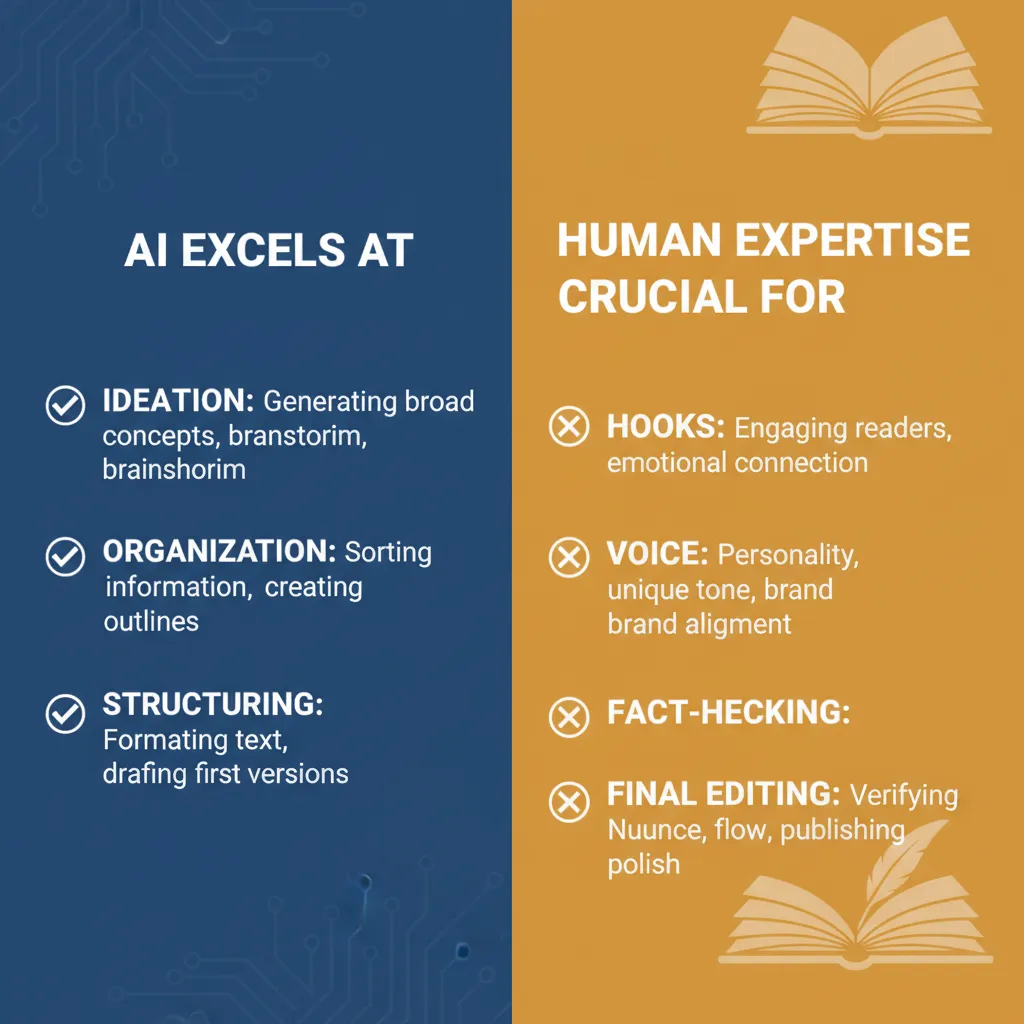
The biggest mistake is treating AI as a writer. It isn’t. It’s a thinking partner.
When you’re staring at a blank page and have no idea what to write about, AI is phenomenal. Ask it directly:
- What interesting topics exist in my niche?
- What angles haven’t been covered?
- How would I explain this concept to someone new?
- What comparison or contrast would make this clearer?
You get back a foundation. Not a finished piece—a direction. That alone cuts your planning time in half because you’re not starting from zero.
Then comes the second part where AI saves massive time: organization. You’ve written your thoughts freely, messily, in whatever order they came out. Now you feed that draft to AI with a specific structuring prompt:
“Take this text and reorganize it so the logic flows naturally. Highlight the key points. Add or remove words to emphasize the main message. Provide 2–3 concrete examples that illustrate each point.”
What you get back is a skeleton. Not perfect, but structured. Clear. Ready for your final pass. This is where the time savings are real. You’re not starting from scratch with organization; you’re editing something that already has shape.
Where AI Fails: Hooks, Voice, and Trust
Don’t use AI to write your opening hook. This is a common trap. AI-generated hooks are generic because they’re trained on thousands of them. If you let AI write your hook, you’ll spend more time editing it than it would have taken to write it yourself.
Your hook is where your voice lives. Where you make the reader stop scrolling. AI can suggest ideas for hooks. It can’t write the one that works for you.
The same applies to fact-checking. AI hallucinates. It sounds confident while being wrong. Every number, every claim, every reference needs human verification. A creator who uses AI extensively for planning still fact-checks everything that comes out the other end. This is non-negotiable if you care about credibility.
Here’s a concrete example: if you write “This token increased by 20% in one day,” people will nod and move on. But if you write “This token increased by 20% while others dropped by 25%,” suddenly people compare. They think: Why did this one outperform? Is it special? What’s different? That comparison creates curiosity and trust. AI can suggest adding comparisons. It can’t know which comparison will land with your specific audience.
The Workflow That Actually Works
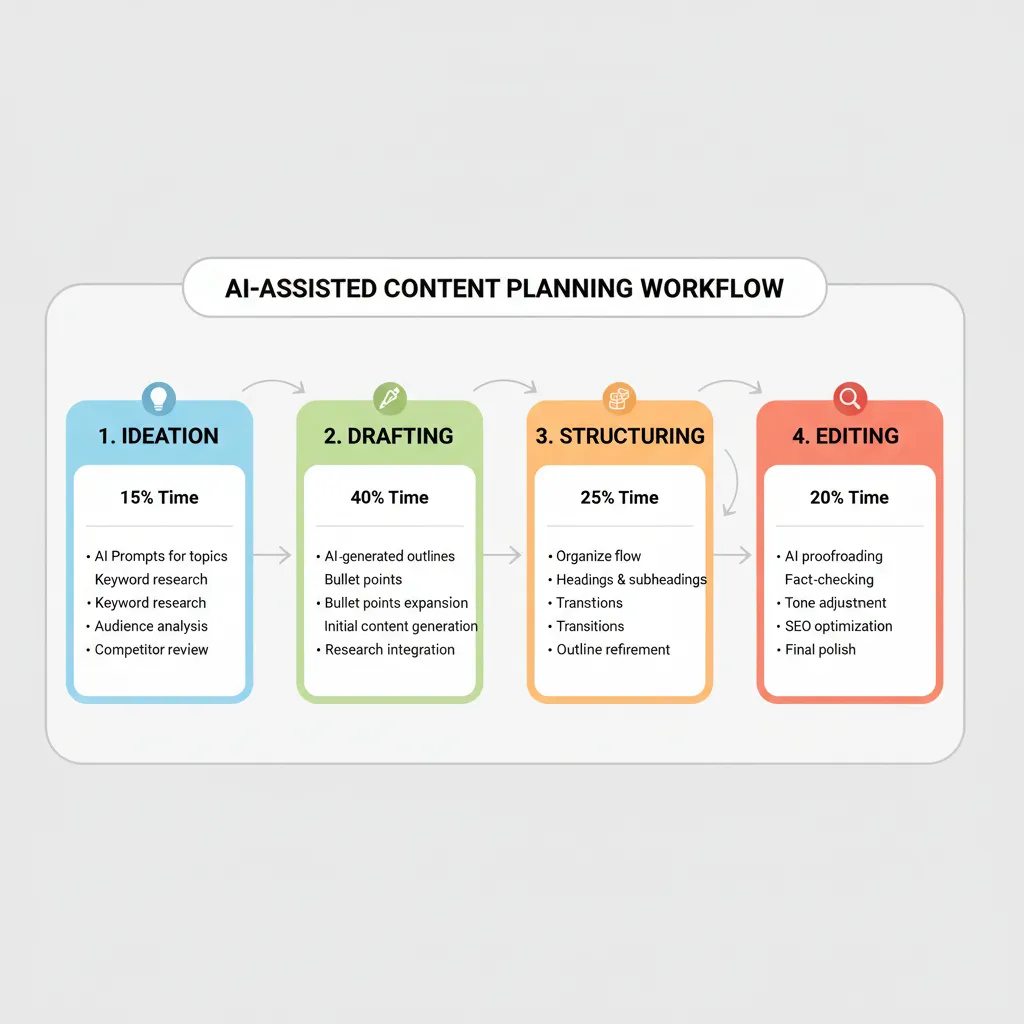
Here’s what the efficient process looks like in practice:
Step 1: Ideation (20–30 minutes)
Chat with AI. Ask questions about your niche. What’s trending? What confuses people? What angles are underexplored? Collect 5–10 ideas. Pick one. You’re not outsourcing thinking; you’re accelerating it.
Step 2: Drafting (30–60 minutes)
Write freely. Don’t worry about structure, order, or perfection. Just get your thoughts out. This is where your knowledge and perspective go in. AI didn’t do this. You did.
Step 3: Structuring (15–20 minutes)
Paste your draft into AI with a structuring prompt. Ask it to organize logically, highlight key points, add examples, tighten language. You get back something organized.
Step 4: Editing (15–30 minutes)
Read through. Fact-check claims. Remove anything that feels forced or off-brand. Rewrite the hook. This is where you make it yours again.
Total time: 1.5–2.5 hours for a solid piece. Compare that to 6 hours of planning-plus-writing, and the math is clear.
The Template Advantage
Generic prompts waste time. Specific templates save it.
Instead of asking AI “write me a blog post about content strategy,” you create a template:
“Generate 5 content ideas for [niche] that address the pain point of [specific problem]. For each idea, provide: the working title, why it matters, who should read it, and one surprising angle I could use. Format as a simple list.”
Run this prompt once. Save it. Use it every planning cycle. You’re not recreating the wheel; you’re following a path you’ve already tested.
Someone who tracked this reported replacing 6 hours of weekly work with 22 templated prompts. Not 22 new prompts for each cycle—22 reusable templates that handle cold emails, proposals, content planning, and other recurring tasks. You build the templates once. Then you run them.
Why This Matters Now
Content planning used to be a bottleneck. You’d spend a day deciding what to write, another day writing it, another half-day editing. The cycle was slow enough that many creators just published less.
Now the bottleneck is gone. But only if you use AI the right way. Not as a replacement for your thinking. As a tool that handles the mechanical parts—organizing, structuring, suggesting—so you can focus on the parts only you can do.
The practitioners who report the biggest time savings aren’t the ones who let AI do all the writing. They’re the ones who use AI for ideation, organization, and editing—the parts that are genuinely time-consuming but don’t require your unique voice.
The Credibility Factor
Here’s something that doesn’t show up in time-tracking but matters for your audience: examples and comparisons build trust faster than assertions alone.
When you say “AI helps with content planning,” it’s a claim. When you say “AI helped me cut planning time from 6 hours to 1.5 hours by handling ideation and organization while I focused on writing and fact-checking,” it’s credible because it’s specific and it’s grounded in a process someone can follow.
AI is good at suggesting examples. It’s bad at knowing which examples your audience cares about. Your job is to pick the right ones. The ones that make someone reading your content think: “Oh, I see exactly how this applies to me.”
The Automation Layer
Beyond the workflow level, there’s a deeper layer: automating the entire planning cycle itself.
AI agents can run research, trend analysis, and competitive monitoring on a schedule. While you sleep, they’re gathering signal about what’s trending in your space, what questions your audience is asking, what gaps exist in coverage. You wake up to a summary, not a blank planning document.
This is where the 39x ROI comes from. You’re not saving time on one piece. You’re automating the entire research-and-planning phase so it runs continuously, without you touching it.
For most solo creators or small teams, this is overkill. But for anyone publishing regularly and trying to stay ahead of trends, it’s the difference between reactive and proactive content.
What You Need to Do Tomorrow
Start small. Don’t try to automate everything at once.
Pick one content type you create regularly. Write down exactly what you do now, step by step. How long does each step take?
Now identify where AI could actually help:
- Ideation? Yes. Use AI to brainstorm angles and topics.
- Structuring? Yes. Use a prompt to organize your draft.
- Fact-checking? No. That’s on you.
- Writing the hook? No. That’s on you.
- Editing for voice? No. That’s on you.
Build a prompt template for the AI parts. Test it three times. Time yourself. Compare to your old process.
If you save 2–3 hours, you’ve found something. Build on it. Add another template. Expand the workflow.
The creators saving 6 hours per week didn’t start by automating everything. They started by automating one thing well, then added another, then another.
The Role of Continuous Publishing
Here’s where the time savings compound: if you’re publishing regularly, the cumulative effect is enormous.
One piece saved 2 hours. Twenty pieces per month saved 40 hours per month. That’s a full work week. Over a year, that’s 480 hours—a full quarter of your time—reclaimed for strategy, audience building, or just breathing.
But that only works if your system is consistent. If you’re using the same prompts, the same workflow, the same editing checklist every time. Consistency is what lets you compound the savings.
This is why templated prompts matter more than one-off requests. Templates are repeatable. Repeatable systems scale.
The Honest Part
AI for content planning works. The numbers are real. But it’s not magic.
You still need to know your niche. You still need to know your audience. You still need to write clearly and think clearly. AI doesn’t replace any of that. It just handles the parts that are mechanical enough to be handled.
If you’re a bad writer, AI won’t fix that. If you don’t know what your audience cares about, AI won’t figure that out. If you’re publishing random topics with no strategy, AI planning won’t save you.
But if you know what you’re doing and you’re just tired of the grunt work, AI is genuinely useful. It’s the difference between a full day of planning and a couple of hours.
Building Your System
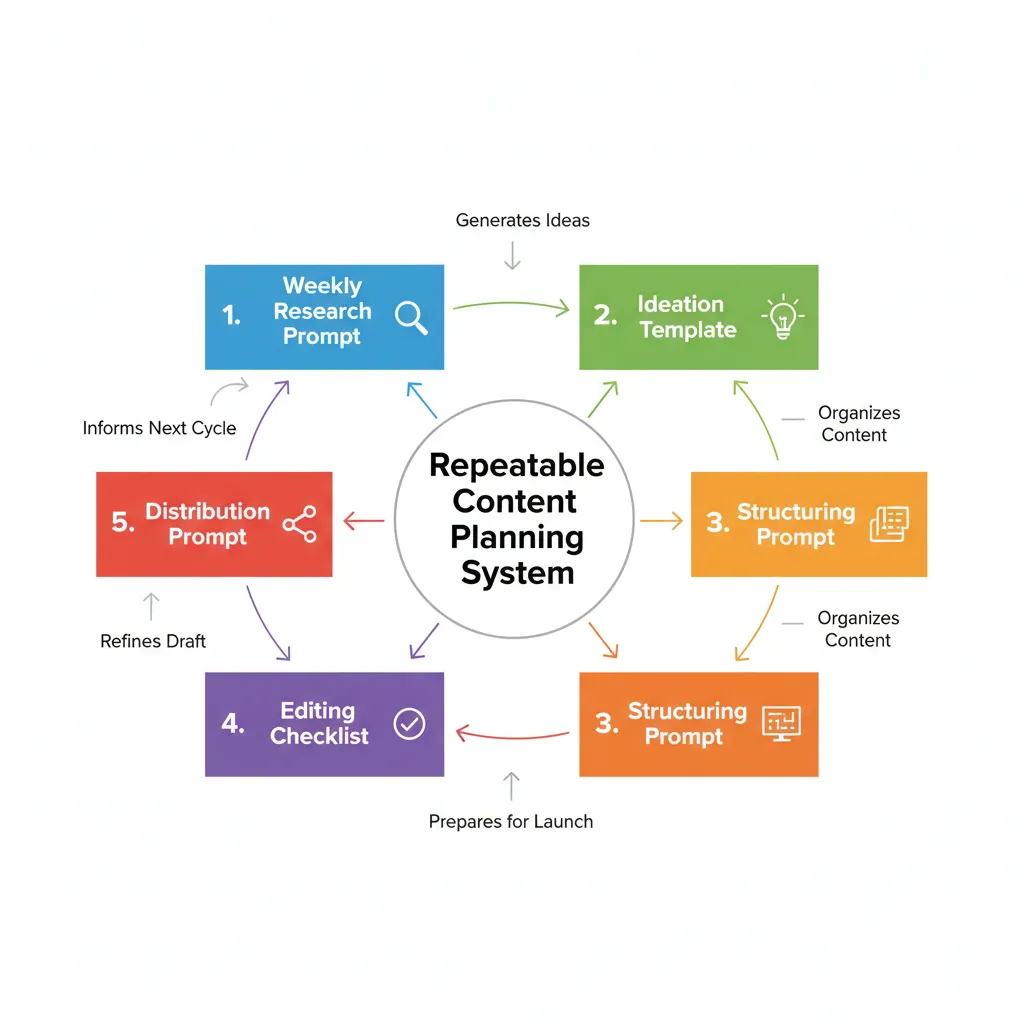
The teams and creators who get the most from AI for content planning do one thing consistently: they treat it as a system, not a tool.
A tool is something you use when you need it. A system is something that runs automatically because you’ve built it to work that way.
Your system might look like:
- Weekly research prompt that surfaces trending topics in your niche (run automatically or on schedule)
- Ideation template that generates 5–10 angles for each topic
- Structuring prompt that takes your draft and organizes it
- Editing checklist that you run through before publishing
- Distribution prompt that suggests angles for social media based on the piece
Once this system is built, adding a new piece to your calendar is a matter of running the prompts in sequence. Not starting from zero every time.
This is also where platforms that integrate AI with content calendars and publishing become useful. They let you build the system once, then execute it repeatedly without manual handoff.
The best systems are the ones you don’t have to think about. You follow the process, and the process handles the rest.
Scaling to Your Team
If you’re solo, the time savings are personal. If you have a team, they’re organizational.
A small content team that uses AI for planning and structuring can produce 3–4x more pieces in the same amount of time. Not because they’re working harder. Because they’re not wasting time on the mechanical parts.
But this only works if everyone is using the same templates and the same workflow. Consistency across the team is what makes it scalable.
The cost of setting up those templates is maybe a few hours. The return is months of faster output. That’s a good trade.
The Search Visibility Angle
Here’s something that doesn’t get talked about enough: AI for content planning helps you publish more consistently, and consistent publishing helps your search visibility.
Google rewards sites that publish regularly on a topic. Not because it loves AI. Because consistency signals that you’re serious about the subject and that you’re keeping information fresh.
If AI planning lets you go from publishing once a month to twice a week, your search visibility will improve. Not because AI writes better. Because you’re publishing more, and more is better for search when the quality is consistent.
This is why the time savings matter beyond just personal productivity. Faster planning means more content. More content means more pages in the index. More pages means more opportunities to rank.
The creators and teams that use AI for content planning strategically aren’t just saving time. They’re building a competitive advantage in search because they can afford to publish more frequently than competitors who still do it manually.
FAQ
Does AI for content planning work for all niches?
Yes, but the specificity of your prompts matters more in niche areas. If you’re in a technical field, you’ll need more detailed prompts and more fact-checking. If you’re in a general space, AI can be more hands-off. The workflow is the same; the oversight changes.
How much does it cost?
Most AI tools for content planning range from free (if you’re using ChatGPT) to $100–200/month for specialized services. The ROI is usually positive within the first month if you’re publishing regularly.
Can I fully automate content planning with AI?
Partially. You can automate research, ideation, and structuring. You can’t fully automate strategy, fact-checking, or voice. The human element is still necessary for quality.
What if I don’t know how to write good AI prompts?
Start with templates. Copy prompts that work for others. Test them. Adjust them for your niche. You don’t need to be a prompt engineer; you just need to be specific about what you’re asking for.
Will AI-planned content rank in search?
Yes, if it’s factually accurate, well-structured, and answers the reader’s question. AI planning doesn’t hurt your search performance. Lazy execution of AI planning does.
How do I know if AI planning is working for me?
Track time before and after. Track publishing frequency before and after. Track search visibility over 2–3 months. If all three are up, it’s working.
The Real Takeaway
AI for content planning isn’t about replacing you. It’s about handling the parts of planning that are repetitive and mechanical so you can focus on the parts that require judgment, creativity, and knowledge.
The time savings are real—6 hours down to 1.5–2 hours per piece is achievable and documented. But the savings only happen if you use AI as a thinking partner and organizational tool, not as a replacement for writing or fact-checking.
The creators who report the biggest wins aren’t the ones who let AI do everything. They’re the ones who use AI for ideation and structuring, do the writing and thinking themselves, and then fact-check and edit the output.
If you’re publishing content regularly and you’re not using AI for planning, you’re leaving hours on the table every week. But if you’re using it wrong—letting it write your hooks or skipping fact-checking—you’re adding work, not removing it.
Start with a single workflow. Test it. Measure the time. If it works, build templates around it. If those templates work, add another template. This is how you go from saving an hour per piece to saving 6+ hours per week.
The difference between someone who saves 2 hours and someone who saves 6 hours isn’t intelligence or talent. It’s having a system that works and running it consistently.